Crop PDF
Upload your PDF
Drag and drop your files here or click to browse
PDF cropped successfully!
—
🌟 The Most Powerful Online Tool To Crop PDF Documents Quickly
✂️ Ultimate Solution To Crop PDF Fast
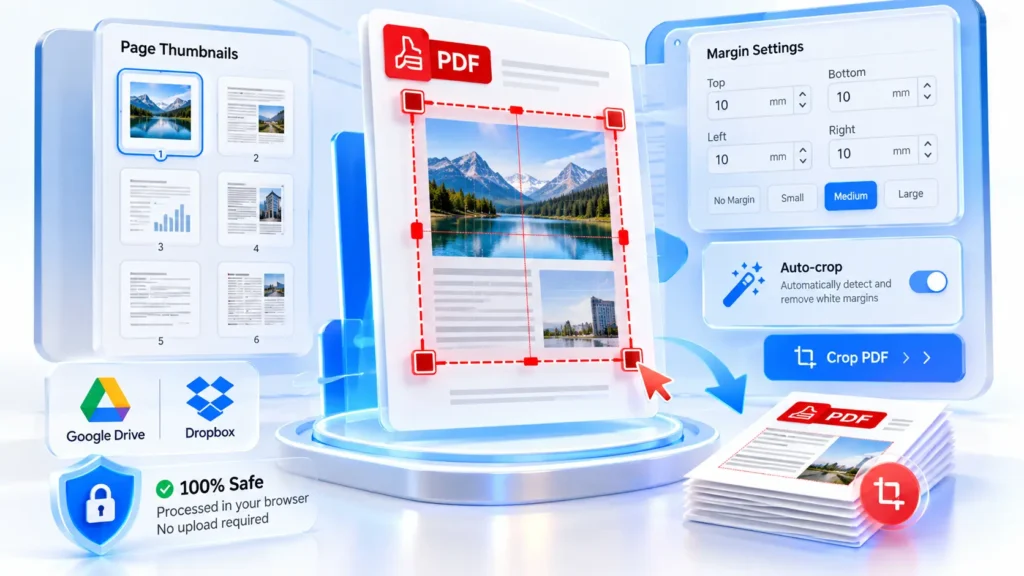
Managing digital documents requires precision and speed in modern professional environments. Our advanced platform allows you to crop PDF files instantly without any complicated software installations. You can easily trim unwanted white margins or extract specific sections from your pages. This powerful utility ensures your documents always look clean and perfectly formatted. Whether you are handling academic papers or corporate reports, this system delivers exceptional results every single time while maintaining complete structural integrity seamlessly.
⚡ Lightning-Fast Processing For Everyone Here
Time is incredibly valuable when you are working on urgent digital projects. Waiting for heavy documents to process can disrupt your entire daily workflow. Because our system operates directly within your web browser, you can crop PDF documents in mere milliseconds. There is absolutely no need to upload large files to distant servers. Simply select your desired area and watch the transformation happen immediately. Enjoy uninterrupted productivity and unmatched rendering speeds without any frustrating delays.
🔒 Enterprise-Grade Security And Total Protection
Data breaches represent a significant concern across the modern digital landscape today. Whenever handling sensitive financial records or personal medical information, privacy remains paramount. Unlike traditional cloud services, our secure tool lets you crop PDF pages entirely offline on your device. Your confidential paperwork never leaves your local computer memory during processing. Once you close the browser tab, all temporary data disappears permanently. You retain absolute ownership and control over private information at all times.
💯 Zero Quality Loss During File Edits
A common issue with standard utility tools involves severe visual quality degradation. Blurry text and pixelated graphics can easily ruin a highly professional presentation. We utilise advanced rendering algorithms whenever you need to crop PDF files accurately. Whether you use high-definition photographs or intricate vector graphics, the final output remains crystal clear. Every single pixel gets translated perfectly into the newly adjusted document format. Your important architectural blueprints and digital art look spectacular.
☁️ Seamless Cloud Storage Integration Built-In
Modern professionals rarely store all their important files on a single storage device anymore. Your critical business data likely sits distributed across multiple online platforms continuously. To streamline your daily workflow, our efficient utility allows you to crop PDF items directly from Google Drive and Dropbox integrations seamlessly. You can effortlessly fetch necessary files from cloud storage and return the finalised documents straight back. This functionality completely eliminates tedious manual downloading processes for active individuals.
📱 Universal Cross-Platform Accessibility Guaranteed Now
You should never remain restricted by your specific hardware choices or operating systems. Our versatile web application functions flawlessly across all modern digital devices available today. Whether you operate a desktop computer or a mobile smartphone, the ability to crop PDF documents stays universally smooth. Users do not need to install tricky third-party mobile applications whatsoever. Simply open your preferred web browser and navigate directly to our platform to initiate instant modifications without trouble.
🚀 Boost Productivity With Advanced Margin Adjustments
Adjusting page boundaries accurately requires highly intuitive control mechanisms and robust graphical interfaces. Professionals frequently struggle with overly complex software suites that demand steep learning curves. We designed this intuitive interface so anyone can crop PDF margins with absolute precision instantly. The visual bounding box lets you drag edges smoothly over your desired content area effortlessly. You can visually confirm exact measurements before finalising any output, ensuring perfect alignment for printing or digital publishing needs.
📑 Hassle-Free Document Management Made Easy
Dealing with awkward file sizes often slows down important administrative tasks and assignments. Unwanted blank spaces around text make documents look highly unprofessional and extremely messy. Utilising our streamlined online editor to crop PDF pages solves these visual problems immediately. By removing unnecessary borders, you effectively reduce overall file sizes while simultaneously improving readability. This bulk enhancement capability serves as an absolute lifesaver for university students submitting lengthy assignments or human resources teams compiling portfolios.
🛡️ Completely Safe And Secure Local Processing
Cybersecurity threats continue to evolve rapidly throughout our globally connected digital business ecosystems daily. Trusting random online utilities with your sensitive proprietary information carries immense hidden risks. Fortunately, our advanced architecture enables you to crop PDF files safely without server dependencies. All core processing logic executes directly inside your personal browser environment using local resources alone. This innovative client-side execution model guarantees that no unauthorised entities can intercept or monitor your highly valuable confidential documents.
🎯 Precision Editing For Modern Digital Workspaces
Creating visually appealing presentations requires specialised tools that handle complex document formatting perfectly. Standard viewing applications simply cannot modify embedded page boundary boxes safely or accurately. This is exactly why professionals choose our dedicated system to crop PDF elements reliably. Our tool modifies underlying structure variables accurately, ensuring compatibility across all standard industry reader software. Eliminate those frustrating layout inconsistencies today and experience the pinnacle of reliable document management designed specifically for modern dynamic workspaces.
🛠️ How To Crop PDF Pages Easily
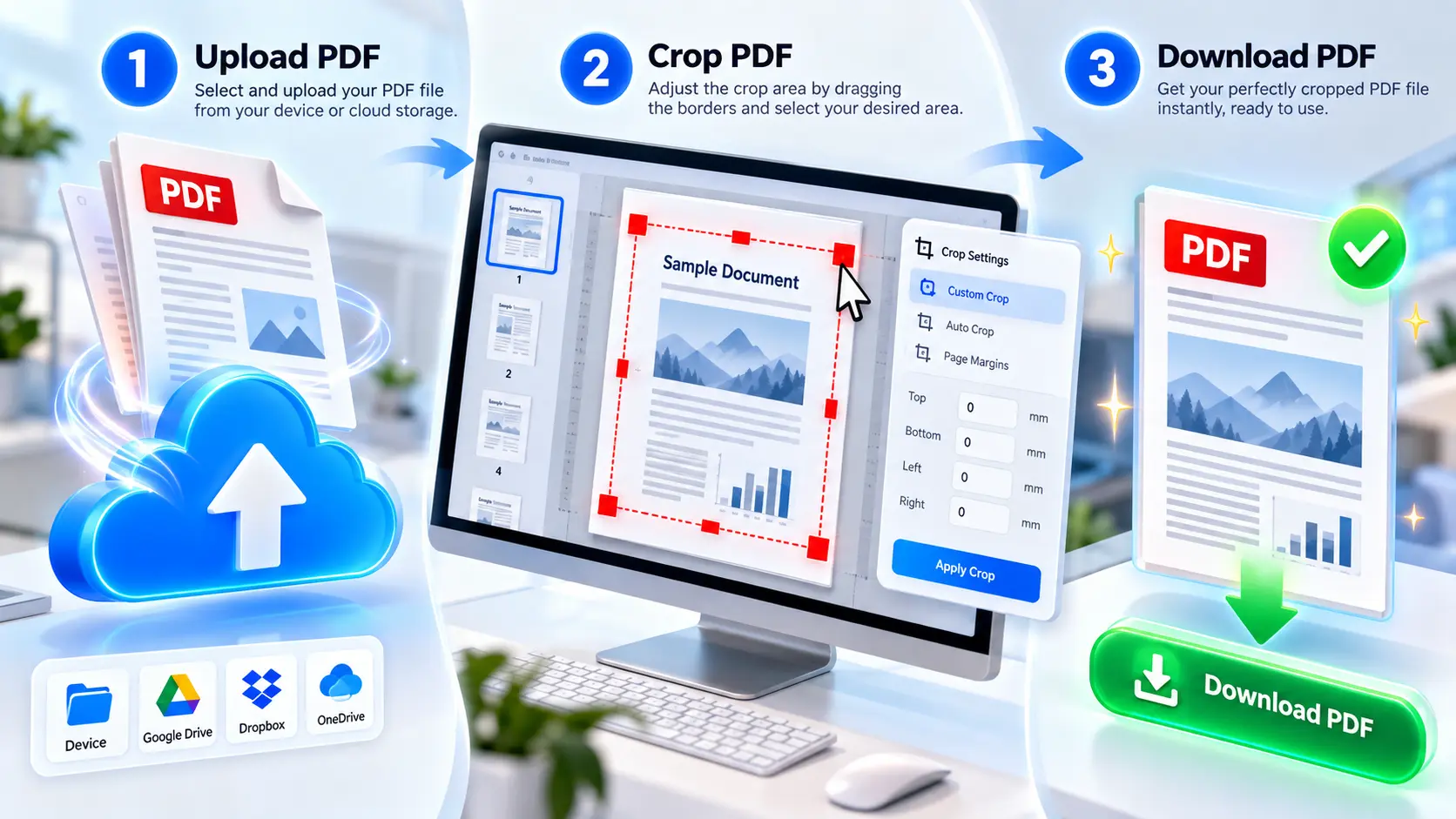
Learning new technical processes can sometimes feel overwhelming for many non-technical individuals. We have purposefully simplified the entire digital modification journey into basic, manageable actions. Anyone who wants to crop PDF content can achieve their desired results within seconds. The intuitive workspace guides you naturally through each required interactive step without any confusion. Read the detailed sequential instructions provided below to understand exactly how our powerful graphical utility transforms your unorganised files perfectly today.
📂 Step One: Upload Your Digital Files
Initiating your editing session requires providing our system with your target digital file. Locate the prominently displayed upload button positioned near the top of your screen. When you prepare to crop PDF documents, simply click this button to browse your folders. Alternatively, you can effortlessly drag and drop your selected document directly onto the interface. We also support seamless direct fetching from major cloud storage providers for added convenience during your busy administrative workflow routines.
📏 Step Two: Adjust Required Page Borders
Once your chosen file successfully loads into the interactive workspace viewport, visual adjustment becomes incredibly straightforward. Grab the highlighted control handles located around the visible bounding box perimeters. Drag these active corners inwards whenever you must crop PDF borders securely. The dynamic selection overlay highlights exactly what content remains visible after processing concludes. Review your current dimensional changes visually across multiple affected pages before committing to final modifications using our intuitive right-side properties panel.
💾 Step Three: Save Your Final Results
After carefully verifying your selected margin dimensions, applying the final transformation requires just one single click. Press the prominent primary action button located at the bottom section to crop PDF files definitively. Our highly optimised browser engine processes your heavy documents instantly without uploading anything externally. Once the success notification appears prominently, simply download your perfectly resized digital file directly to your computer hard drive or send it straight back into your preferred cloud storage.